Saturday, November 26, 2011

iPhone 4S: Obtainable at Airtel and Aircel in INDIA !!

In India, Apple’s iPhone 4S smartphone is now on hand for buy via two of the country’s largest wireless carriers, namely Airtel and Aircel.

Airtel and Aircel announced the release of this handset device with a price tag of Rs 44,500 ($865 / 642 Euros) attached to it for the 16GB model.

The 32GB and 64GB flavors of the iconic smartphone, pricing it at Rs 50,900 ($990 / 735 Euros) and Rs 57,500 ($1,120 / 830 Euros), respectively.

The iPhone 4S, regrettably, does not land on the market in India with features that will make it a lot different when compared to the International version.

Starting with November 18, the iPhone 4S was available for pre-order in the country and will arrive on user’s hands starting today, it seems.


The device features the same hardware and capabilities as the flavor that arrived in other markets around the world, starting with:
* the 3.5-inch widescreen touch display that can deliver a 960 x 640-pixel resolution.
* packs a dual-core A5 application processor inside, along with
* an 8-megapixel photo snapper on the back, with support for 1080p HD video recording.
* a front camera for video calling, as well as
* great browsing capabilities and
* enhanced gaming features courtesy of the new iOS 5 platform loaded on it.
* voice-activated personal assistant, Siri, which can be used for getting a lot of information by voice.
Siri can be used for finding the location of a specific restaurant, for example, as well as for making calls, sending messages, or even for scheduling meetings the like.


iPhone 4 and iPhone 3S, go at the moment for Rs 37,900 (8GB) and for Rs 20,900 (8GB), respectively. Apple iPhone 4S has been released on the Indian market Next to the previously available iPhone 4 and iPhone 3S.

Thursday, November 24, 2011

Airtel announces iPhone 4 8GB at Rs 37,900


Airtel has finally taken the wraps off its iPhone 4 8GB and has priced it at Rs 37,900, which will be available from November 25 along with the new iPhone 4S and the older iPhone 3GS 8GB. Ironically, users can still get hold of the iPhone 4 16GB variant, which will be discontinued from tomorrow), for Rs 35,500! Most stores have ran out of stocks but they can still be found in some places. In all likelihood, Aircel will also offer the iPhone 4 8GB for Rs 37,900. While we won’t get into the blame game of who is responsible for these absurd pricing – Apple or the carriers – there is no way they can justify the pricing of a lower capacity version of the same product on the depreciating Rupee. If you still want to go for an iPhone 4, we suggest you recce the market and get hold of the 16GB variant today. Happy hunting!

Wednesday, November 23, 2011

Apple iPhone 4 refurbished units will be available in India for Rs 22,500


While we are waiting for an official announcement, we can confirm that Apple iPhone 4 factory refurbished units are now available in India for Rs 22,500 for the 16GB variant. These units come with proper bill and one-year warranty. Refurbished units should not be confused with usual second-hand units – these are sent back to the assembly factory where they are cleaned, and some components changed. They come with the same support as new phones. We are also hearing there is a shortage of brand-new iPhone 4 16GB, which can be attributed to the upcoming iPhone 4S launch in India on November 25. Apple will introduce the 8GB variant of the iPhone 4 and discontinue both the 16GB and 32GB variants once the iPhone 4S is launched. If you are still looking for an affordable iPhone 4, we think the refurbished units will be your best bet. Apple retails refurbished units in other countries too.

Monday, November 21, 2011

Apple iPhone 4S price around the world


Late last week, both Airtel and Aircel announced some ridiculous prices for the iPhone 4S that goes on sale on Friday, November 25. For those living under a rock – Rs 44,500 (16GB), Rs 49,900 (32GB) and Rs 57,500 (64GB). Over the weekend I wrote I won’t be buying the iPhone 4S from India as it is not worth paying the high premium just to get after sales support. Hardly anything goes wrong with an iPhone (unless you are jinxed) and physical damage (busted display etc) are not covered under warranty anyway. Yes, there are some interesting alternatives coming up for the iPhone 4S (which were mentioned in the same article) but still I would love to have an iPhone 4S.

So I spent most of my Sunday figuring out where do you get the cheapest iPhone 4S and prepared a cheatsheet. Yes, Hong Kong offers the cheapest price (Rs 33,500 for 16GB) but it is out of stock with no indication of when it will be available. Also, it helps if you have friends or family in any of these countries who happen to be coming back soon, so you can figure out whether they can carry one for you. And to top things off, they might even be eligible for a VAT/GST refund in case they are non-residents in that country, which could sweeten the deal even more. Read on to find which country you should aim to get your iPhone 4S from.

Spoiler Alert: NOT INDIA!

Some disclaimers: Apple won’t provide any after-sales service or support in India for iPhones bought outside India. In case there is some manufacturing defect/other fault, you won’t be able to get it serviced at any Apple authorized service center. We have rounded off the figures for ease of use and are indicative prices that might vary with the actual cost. All prices mentioned below include local taxes. You can check at the Apple Store whether you are eligible for a tax refund. If eligible, the store will offer a tax refund certificate that can be refunded at the airport while leaving that country. All the prices mentioned below are for iPhone 4S 16GB


Sunday, November 20, 2011

Aircel’s iPhone 4S 64GB sold out within hours

Aircel’s iPhone 4S 64GB sold out within hours


Aircel’s iPhone 4S pre-order started much later than Airtel’s yesterday. While both carriers had the same price for the iPhone 4S, it was only Aircel that offered the iPhone 4S 64GB variant for a princely Rs 57,500! However, if Aircel’s pre-order site is to be believed, the highest-end version of the iPhone 4S was sold out within hours of the pre-orders going live. We had readers pinging us within five hours, telling us about it being sold out! We do not know how many units Aircel had of the iPhone 4S 64GB but we know for a fact both carriers have very limited stocks of all the three variants, something the carriers were not really happy about. We are also yet to come across anyone who pre-ordered the 64GB variant

Saturday, November 19, 2011

New iPad due in March, aluminum iPhone 5 may launch this summer


Apple reportedly plans to launch a slightly thicker (0.7mm) iPad in March with a dual-backlit display and a new high-resolution screen. It may be shown off in January if it’s ready in time, iLounge reports. In addition, iLounge cites its “most reliable source” in stating that Apple will likely launch the iPhone 5 next summer. In contrast to a number of rumors, the site says that the iPhone 5 does not have a tear-drop design. Instead, it will be 8mm longer than the current model and will sport a metal case as well as a 4-inch display. Lastly, Apple’s MacBook Pro line will be updated in 2012 and the new models will be thinner than the current generation notebooks, the report claims.

Official Prices of iPhone in India

Official Prices of iPhone in India


Airtel & Aircel are about to sell iPhone 4S in India starting from November 25th. also they have revised the prices of iPhone 3GS & iPhone 4.


the price of their current 3 model range of iPhones are :

iPhone 3GS (8GB) : Rs 20,900
-
iPhone 4 (8GB) : Rs 37,900
-
iPhone 4S (16GB) : Rs 44,500
-
iPhone 4S (32GB) : Rs 50,900
-
iPhone 4S (64GB) : Rs 57,500-
-
Refurbished iPhone 4 (16GB) starts from Rs 22,500
----------------------------------------------------------------------------------------

Friday, November 18, 2011

Carrier stores leak iPhone 4S price in India


While we still wait for the iPhone 4S pre-orders to go live on Aircel, we are hearing whispers of iPhone 4S pricing in India courtesy Aircel and Airtel stores in the city. According to them (mind you, it is not an official announcement) the iPhone 4S will be available for Rs 44,500 (16GB), Rs 50,900 (32GB) and Rs 57,500 (64GB). The iPhone 4 8GB will be available for Rs 37,900, which would be more expensive than what its 16GB version was introduced in India. The iPhone 3GS 8GB has also received a price hike and will now cost Rs 20,900, according to an Airtel Store. There is no word on tariff plans and we are not sure how any tariff plan. We are not sure why anyone would buy an iPhone 4S from India and not simply ask friends or relatives to pick up factory unlocked ones from the US, instead.

Thursday, November 17, 2011

Aircel starts pre-booking iPhone 4S from Nov 18 plus some exclusive details


Aircel today announced it will start pre-booking for the iPhone 4S from November 18, with the launch happening on November 25. This is line with what we have been exclusively reporting for over a fortnight now. Both Airtel and Aircel will initiate the fanfare that usually happens with any iPhone launch on November 24, with sales starting from midnight in select stores in major cities.

Apart from the online pre-booking, we are also hearing at least one carrier might also have some online booking post the launch. Our sources are indicating the carriers have received lower number of units than what they would have liked. Apple is reportedly diverting a big chunk of its iPhone 4S inventory to Europe and the US, where the demand remains high despite reports of battery woes that have not been fully resolved with the recent iOS 5.0.1 update. The shortage of iPhone 4S inventory is expected to continue till January, once the holiday season shopping frenzy in the west subsides.

Tuesday, November 15, 2011

Siri Finally Gets Cracked! Can Now Be Ported To Android, Mac, iPhone 4, iPad 2!

You read it right, folks! You’ll be able to soon to run Siri on any device you just wish. Applidium, a French engineering firm, has managed to crack Siri’s security protocol that made Siri limited to the iPhone 4S. In other words, you’ll be able to run Siri on any device including Android, Mac and Windows.

This also includes any model of the iPhone, iPod touch and iPad. Siri is now not limited to the iPhone 4S, it can run on any iOS device and even on non-iOS devices.

What’s more amazing? Well, the awesome thing about this is that developers can now integrate Siri inside their apps too.

The iPhone 4S really sends raw audio data. It’s compressed using the Speex audio codec, which makes sense as it’s a codec specifically tailored for VoIP.The iPhone 4S sends identifiers everywhere. So if you want to use Siri on another device, you still need the identfier of at least one iPhone 4S. Of course we’re not publishing ours, but it’s very easy to retrieve one using the tools we’ve written. Of course Apple could blacklist an identifier, but as long as you’re keeping it for personal use, that should be alright!

The developers also found that Apple uses a lot of information when it communicates with its servers when it comes to Siri:


The protocol is actually very, very chatty. Your iPhone sends a tons of things to Apple’s servers. And those servers reply an incredible amount of informations. For example, when you’re using text-to-speech, Apple’s server even reply a confidence score and the timestamp of each word.


There’s only one bad thing; you’ll need a UDID of an iPhone 4S to get this cracking working on your device so at any time Apple could block the UDID you used. This means tat Apple could push a fix once it’s released, another cat and mouse game!

Siri was successfully ported to the iPhone 4 and iPod touch couple of weeks back. It has been also connected to Apple’s servers successfully.

Thursday, October 27, 2011

how to perform a semi tethered jailbreak of your iOS 5 iPhone, iPad, or iPod touch.

These are instructions on how to perform a semi tethered jailbreak of your iOS 5 iPhone

A semi-tethered jailbreak is an interim solution which solves the problem of being unable to reboot with a tethered jailbreak. The semi tethered jailbreak by BigBoss will allow you to reboot on the road, but with limited functionality. It is enough that you are no longer stranded, and you can use your phone, text, and many other features. This is just until you get home and can use redsn0w again to “just boot tethered”. Once you do that, you’re back to fully functional state.

Step One

Jailbreak and boot your device tethered using the instructions below:

Create a folder on your desktop called Pwnage

Download RedSn0w 0.9.9b6 from here and place it in the Pwnage folder. Likewise, download the 5.0 firmware from here and place it in the Pwnage folder. (Note: you do not need to download the 5.0 firmware if you are already on iOS 5.0)

Extract the RedSn0w zip file by double clicking it.

Step Two: (You can skip this step if iOS 5 is already installed on your device) Connect your iPhone to the computer and launch iTunes.

Select your iPhone from the list of devices on the left. Now hold down Shift and click the Restore button. Restore is preferred as it won't create any wasted space on your iPhone.
Navigate to the Pwnage folder on your desktop and select the 5.0 firmware ipsw. Click the Choose button to continue.
iTunes will now update your iPhone to the new firmware.

Step Three
Launch the redsn0w application from the redsn0w folder we extracted earlier.

**Windows 7 users may want to try running the redsn0w executable mode as an administrator in Windows Vista compatibility. You can do this by right clicking the executable and selecting Properties from the contextual menu.
Step Four
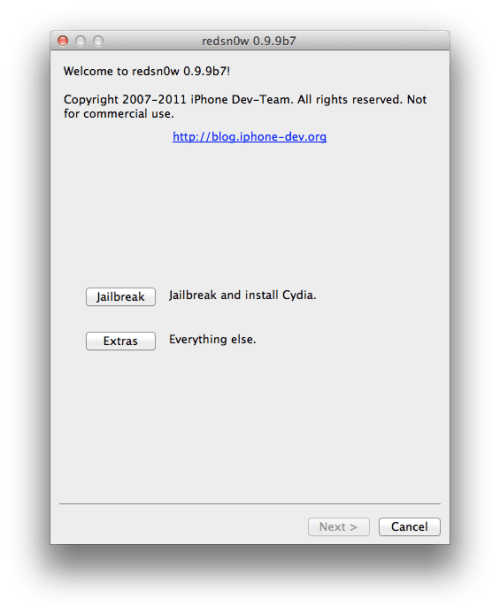
Once RedSn0w opens click the Jailbreak button

Step Five
Plug your iPhone into the computer and make sure its OFF then click the Next button


Step Six
RedSn0w will now guide you through the steps to get into DFU mode.

Hold down both the Home button and the Power button for 10 seconds.

Release the Power button and continue holding the Home button until RedSn0w detects the device.

Step Seven Your iPhone will now reboot

Step Nine
Select Cydia from the list of options and click Next.

Step Ten
Your iPhone will now be rebooted again and RedSn0w will begin uploading the new RAM Disk and Kernel.
Step Eleven
Once this is complete you will be notified that RedSn0w is done. When your iPhone finishes rebooting (5 minutes or so) it will be jailbroken with Cydia on the SpringBoard.

BOOT TETHERED

Once you have jailbroken you will need to rerun redsn0w to boot tethered.

Step One
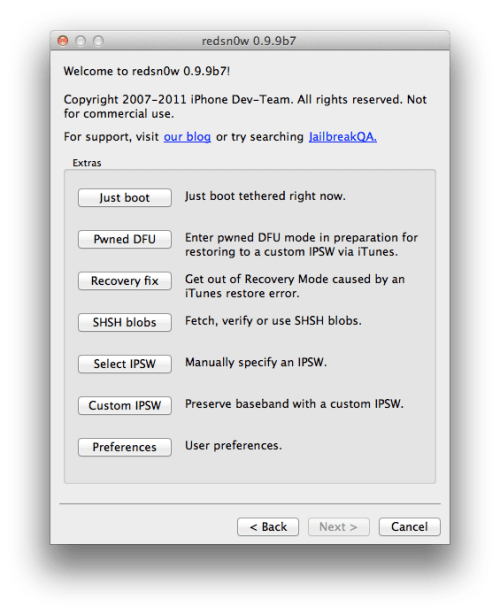
From the main RedSn0w menu click the Extras button.


Step Two
Select Just boot from the Extras menu to just boot tethered.


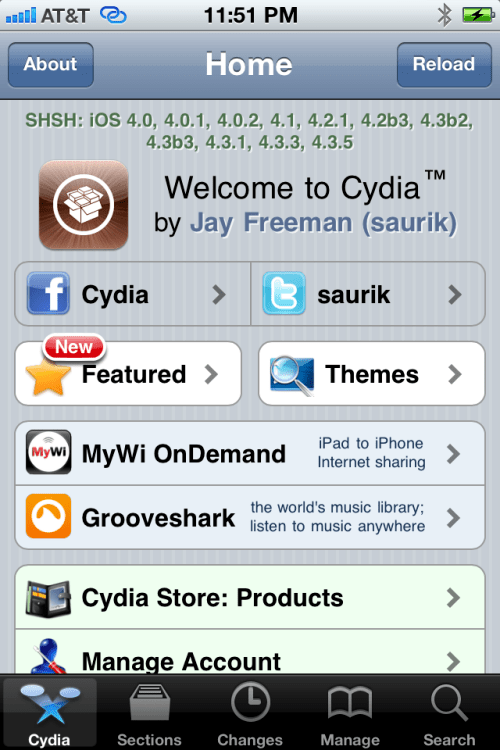
AFTER THAT LAUNCH CYDIA
Step Three
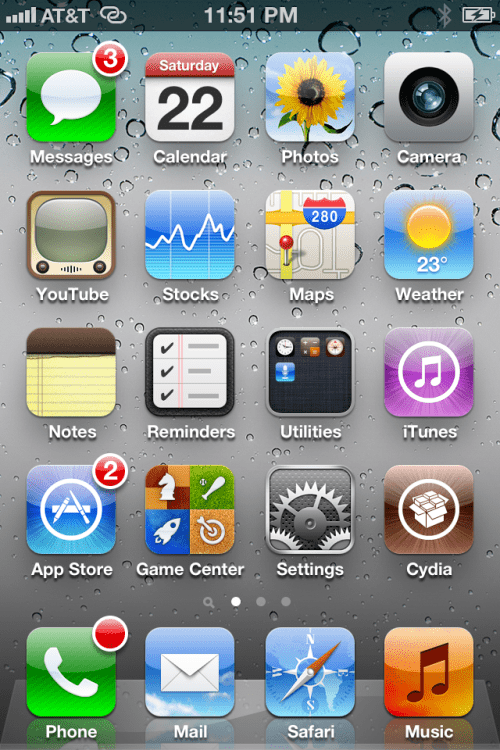
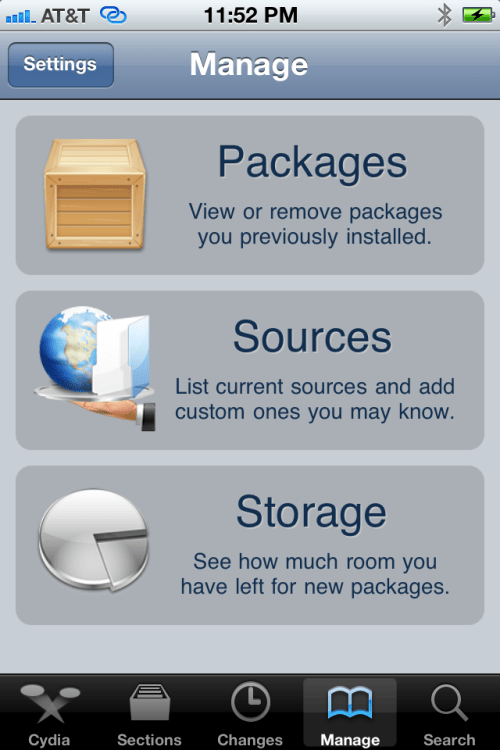
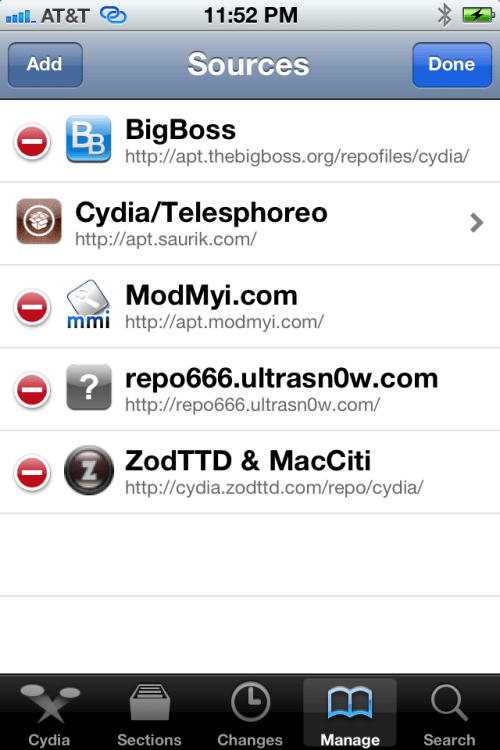
Press to select Manage from the tabs at the bottom of the screen.

Step Four
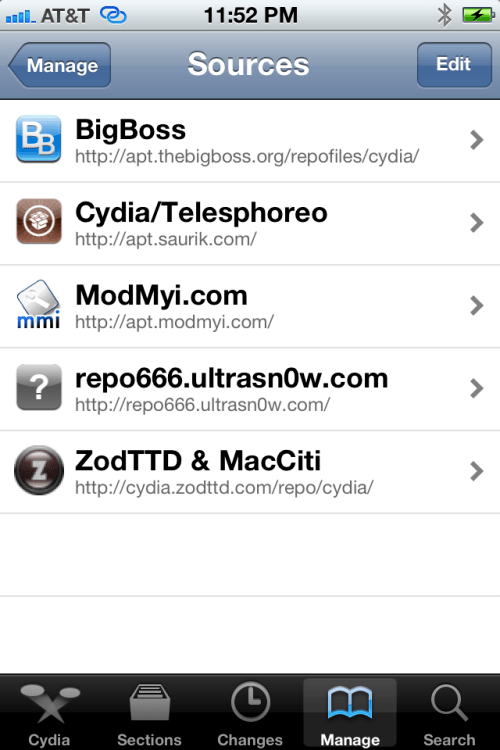
Press the large Sources button.
Step Five
Press the Edit button at the top right of the screen.


Step Six
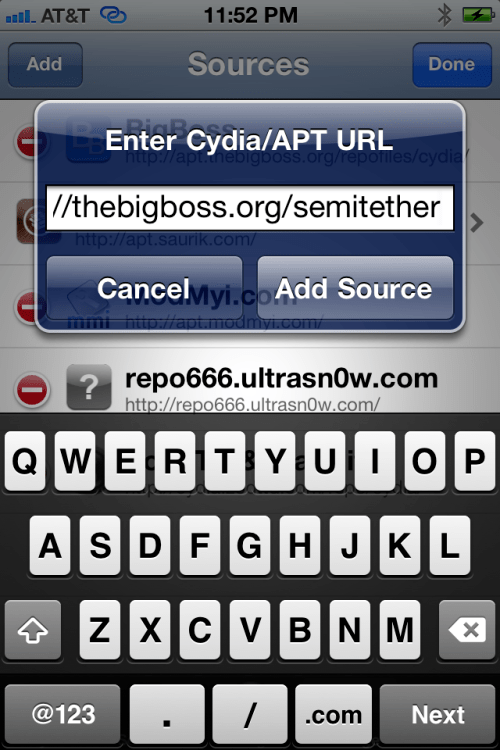
Press the Add button at the top left of the screen.
Step Seven
Input http://thebigboss.org/semitether into the text field and press the Add Source button.

Step Eight
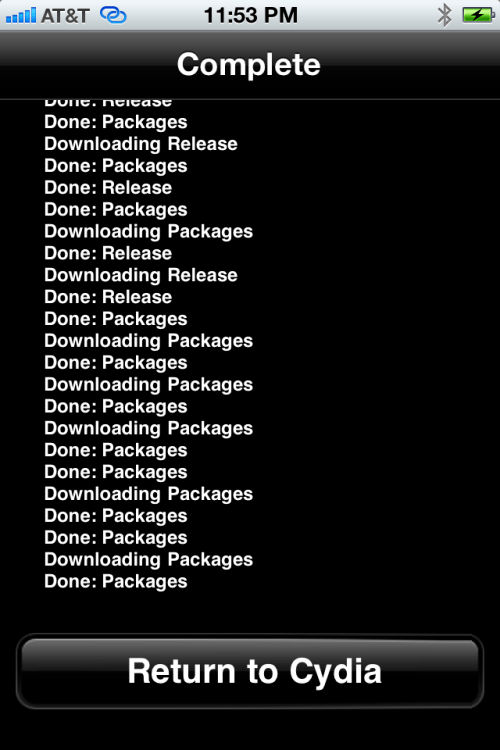
Press the large Return to Cydia button.

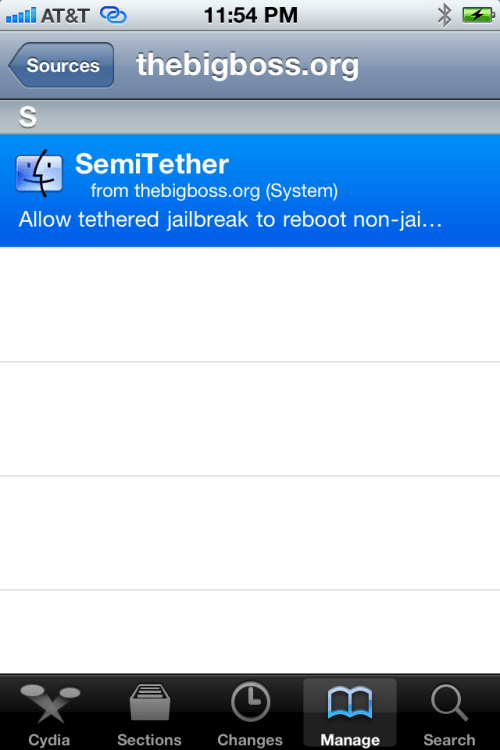
Step Nine
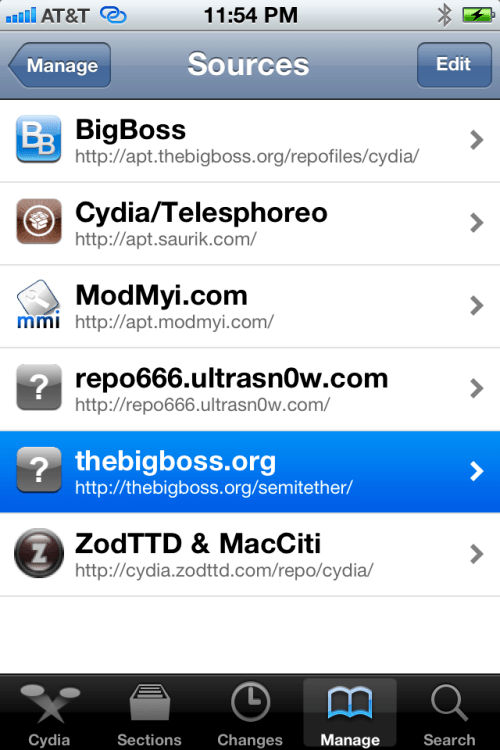
Select thebigboss.org from the list of Sources
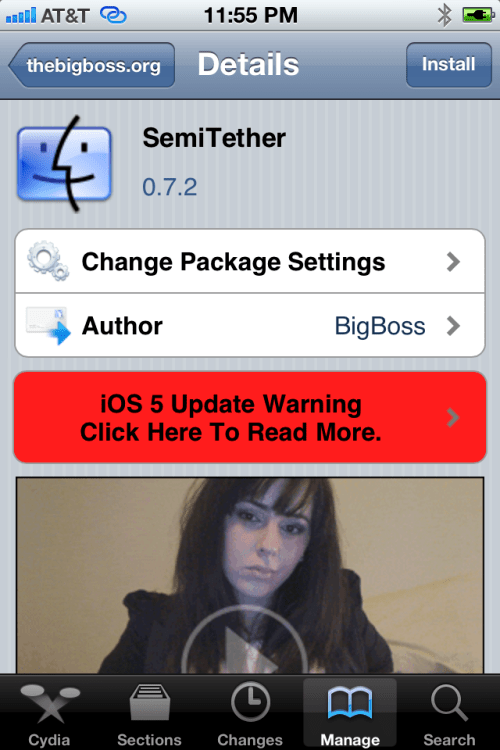
Step Ten
Select SemiTether from the list of Packages

Step Eleven
Press the Install button at the top right of the screen.

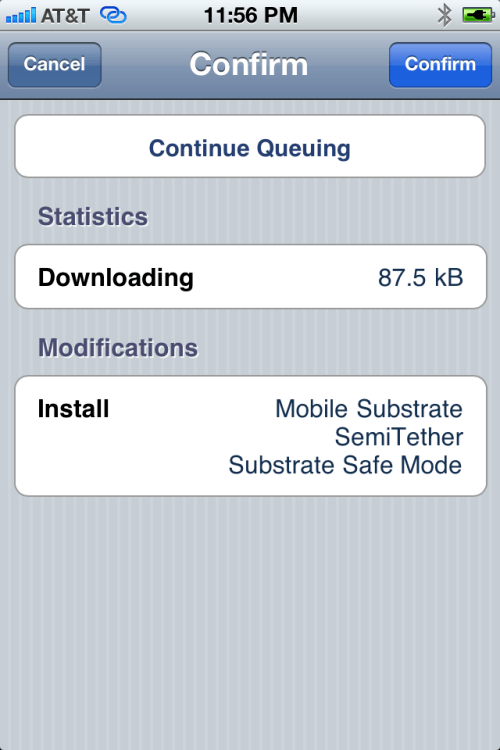
Step Twelve
Press the Confirm button to begin installation.
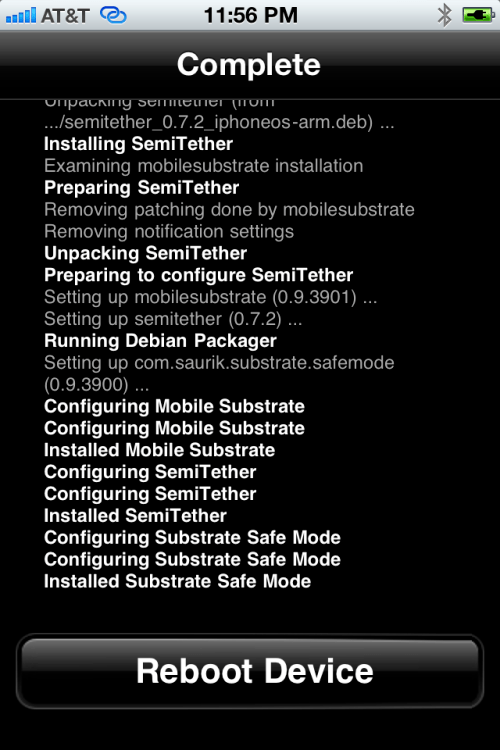
Step Thirteen
Press the large Reboot Device button.
You're device will now reboot without stalling at the Apple logo!
To get full functionality back you will need to boot tethered. Launch RedSn0w as you did in Step One then select Extras then Just boot from the menu.


**A big thanks to BigBoss and all those who made this tutorial possible.

Wednesday, October 5, 2011

iPhone 4S vs iPhone 4 Comparison

The new iPhone 4S will be released on October 14 with the iOS 5 software. Below is an iPhone 4S vs iPhone 4 comparison. You can pre-order iPhone 4S on October 7.
Phone: iPhone 4S iPhone 4
Processor Dual-core A5 chip A4 chip
Carriers AT&T, Verizon, and Sprint AT&T, Verizon, and Sprint
Weight and Dimensions
  • Height: 4.5 inches
  • Width: 2.31 inches
  • Weight: 4.9 ounces
  • Height: 4.5 inches
  • Width: 2.31 inches
  • Weight: 4.8 ounces
Built-in Assistant Siri – allows you to use voice to send messages, set reminders, and more. N/A
Camera 8 Megapixels

  • Autofocus
  • Tap to focus
  • LED flash
  • Backside illumination sensor
  • Five-element lens
  • Face detection
  • Front camera with VGA
5 Megapixels

  • Autofocus
  • Tap to focus
  • LED flash
  • Backside illumination sensor
  • Four-element lens
  • N/A
  • Front camera with VGA


Video Recording Improved HD video recording

  • 1080p 30 fps
  • Tap to focus
  • LED light
  • Video stabilization
HD video recording

  • 720p 30 fps
  • Tap to focus
  • LED light
  • N/A
Video Calling FaceTime FaceTime
Display Retina

  • 960×460 resolution
  • Multi-touch
Retina

  • 960×460 resolution
  • Multi-touch
Cellular and Wireless
  • UTMS/HSDPA/HSUPA/GSM/EDGE in 1 phone
  • Wi-Fi 802.11b/g/n
  • Bluetooth 4.0
  • 2 separate phones for GSM/CDMA
  • Wi-Fi 802.11b/g/n
  • Bluetooth 2.1 + EDR
Battery Life Talk time:

  • Up to 8 hours on 3G
  • Up to 14 hours on 2G (GSM)
Talk time:

  • Up to 7 hours on 3G
  • Up to 14 hours on 2G (GSM)
Price
  • $199 16 GB
  • $299 32 GB
  • $399 64 GB
  • $99 8 GB
  • N/A
  • N/A

Monday, October 3, 2011

Vodafone Lists iPhone 4S on Website


Leaks coming from cell phone carriers continue this morning with Vodafone’s German arm listing an army of iPhone 4S versions on their website.

Vodafone’s website lists placeholders for every version of the iPhone 4S possible. This is notable because every other placeholder until now has been for an iPhone 5, not a 4S. The site lists the iPhone 4S in both black and white models in 16GB, 32GB, and 64GB offerings. This feels more like Vodafone covering their bases than it does a factual, actual leak.

However, another notable entry in their system is a new iPhone 4. Now this isn’t a 4S or iPhone 5, but a regular old, plane Jane iPhone 4, but it’s only 8GB. Apple currently doesn’t offer an iPhone 4 with an 8GB capacity. It appears that Vodafone rounded up every next generation iPhone rumor on the web and created a placeholder for that device. Except the iPhone 5.

The cheaper iPhone 4 listed does line up with pictures leaked to Gizmodo yesterday from Foxconn’s Brazillian factories. Twenty-four hours from the announcement and it seems this is the closest thing to a full-blown leak we’re going to get.

We’ll have full coverage of Apple’s announcements as they happen tomorrow.

Sunday, September 18, 2011

NEW RED SNOW COMING IN FEW HOURS

SUPER , visit as many times but dont leave the jailbreak dev team.


Wednesday, August 24, 2011

The iPhone Evolution [INFOGRAPHIC]

Do you remember the first iPhone which was announced by Steve Jobs ? Steve Jobs told all the people that Apple company is going after only %1 of the SmartPhones markets At the time, there were around 100 million smartphone sales globally, so 1% would have been one million units.


But for your information Apple exceed this number by a large distance, as in the last quarter shipped over 20 million smartphones. Not bad for only 4 years and 4 handsets into the market. But what’s next?

So that's I call the iPhone evolution... watch this Inforgraphic of Apple's devices.


Friday, August 19, 2011

iOS 5 Beta 6 Released! Download Links Available!

Hello,

Apple has just released iOS 5 Beta 6 to its developers. I have together here some general guidelines for upgrading from beta 5 or earlier.

To install iOS 5 beta 6 using over the air software update, you must first erase all content and settings on your device by choosing Settings > General > Reset > Erase All Content and Settings. Over the air software update can be initiated on devices running iOS 5 beta 3 and later by choosing Settings > General > Software Update.
Be sure to backup your devices using iTunes 10.5 beta 4 or through iCloud backup prior to installing iOS 5 beta 6. After installing iOS 5 beta 6, you can restore your device using either iTunes 10.5 beta 6 or through your iCloud backup.

Devices updated to iOS 5 beta can not be restored to earlier versions of iOS. Devices will be able to upgrade to future beta releases and the final iOS 5 software.


IPSW Files:

iPad WiFi

iPad WiFi + GSM

iPad 2 WiFi

iPad 2 Wifi + GSM

iPad WiFi + CDMA

iPhone 3GS

iPhone 4

iPhone 4 CDMA

iPod Touch 3rd Gen

iPod Touch 4th Gen

Apple TV


iTunes 10.5 Beta 6

Apple Mac OS X

Microsoft Windows

Microsoft Windows 64-bit


Xcode 4.2

Xcode 4.2 and iOS 5 SDK Beta 6 for Lion

Xcode 4.2 and iOS 5 SDK Beta 6 for Snow Leopard


iCloud

iCloud Control Panel for Microsoft Windows Beta 4

iCloud for Mac OS X Lion Beta 6


OS X Lion 10.7.2 Update (11C35)

If you installed a previous seed of OS X Lion 10.7.2, please run the included reversioner package followed by the OS X Lion 10.7.2 update without restarting your system. You should restart your system after installing the OS X Lion 10.7.2 Update.


Mac OS X Lion 10.7.2 Delta update

OS X Lion 10.7.2 Update Reversioner


Safari 5.1.1

Download the latest release of Safari for Windows to test Bookmarks and Reading List with iCloud.


Apple Mac OS X Lion update

Apple Mac OS X Lion uninstaller

Microsoft Windows


iWork

iWork for iOS Beta 2


Xcode 4.2

Xcode 4.2 and iOS 5 SDK Beta 6 for Lion

Xcode 4.2 and iOS 5 SDK Beta 6 for Snow Leopard


iCloud

iCloud Control Panel for Microsoft Windows Beta 4

iCloud for Mac OS X Lion Beta 6


OS X Lion 10.7.2 Update (11C35)

If you installed a previous seed of OS X Lion 10.7.2, please run the included reversioner package followed by the OS X Lion 10.7.2 update without restarting your system. You should restart your system after installing the OS X Lion 10.7.2 Update.


Mac OS X Lion 10.7.2 Delta update

OS X Lion 10.7.2 Update Reversioner


Safari 5.1.1

Download the latest release of Safari for Windows to test Bookmarks and Reading List with iCloud.


Apple Mac OS X Lion update

Apple Mac OS X Lion uninstaller

Microsoft Windows


iWork

iWork for iOS Beta 2


Here are the release notes:
The following issues relate to using the 5.0 SDK to develop code.

Accounts
When creating an iCloud account, you can use any Apple ID as long as it is a full email address and not a MobileMe account. If you have a MobileMe account, you can move that account to iCloud. You can find more information on iCloud at: http://developer.apple.com/icloud
FIXED: When setting up an iCloud or MobileMe account using the setup assistant and leaving Find My iPhone on, it might actually turn Find my iPhone off after the setup. Please verify in Settings/Mail, Contacts, Calendar/YourAccount that Find my iPhone is toggled On after leaving the setup assistant.
FIXED: Enabling iCloud services in Setup Assistant may not always be saved correctly. After completing Setup Assistant you should visit Settings > iCloud to verify the state of the iCloud account. If you have multiple iCloud or MobileMe accounts configured on the device you should also visit each of those accounts in Settings > Mail, Contacts, Calendar to verify each account.
FIXED: It is recommended that you disable Bookmarks on multiple accounts. If they are enabled, the results might be undefined.
AirPlay
Starting in iOS 5, video content in applications and websites are AirPlay-enabled by default.
iOS 5 supports AirPlay of video via AV Foundation.
Apple TV
Apple TV Software beta enables users to mirror the contents of an iPad 2 to an Apple TV (2nd generation) using AirPlay. This beta software also enables Photo Stream on Apple TV so users can access photos stored in iCloud. Apple TV Software beta is being provided to test the latest AirPlay functionality with your iOS 5 apps and web sites. If you wish to install Apple TV Software beta on your device, you must first register your device UDID in the iOS Developer Program Portal.
Apple TV may return to the main menu when exiting a TV show played via Home Sharing.
Music playlists are inaccessible via Home Sharing.
Binary Compatibility
On applications linked against the iOS 5.0 SDK, scroll view content offsets will no longer be rounded to integral pixels during a pinch gesture.
Calendar
Birthday calendars are not currently available via the icloud.com website or in Windows. They will be available in a future release.
FIXED: The default calendar is still the On My iPhone calendar despite setting up an iCloud account during Setup Assistant. As a workaround, reset the default Calendar after finishing Setup Assistant in Settings > Mail, Contacts, Calendar > Default Calendar.
FIXED: Pushing iCloud Calendar data is not working in iOS. To sync your iCloud Calendar, launch the Calendar app or refresh the calendars manually using the Calendars button in the top left corner.
Core Image
Several filters have been added since beta 1. The current list now includes the following filters:
CIAdditionCompositing, CIAffineTransform, CICheckerboardGenerator, CIColorBlendMode, CIColorBurnBlendMode, CIColorControls, CIColorCube, CIColorDodgeBlendMode, CIColorInvert, CIColorMatrix, CIColorMonochrome, CIConstantColorGenerator, CICrop, CIDarkenBlendMode, CIDifferenceBlendMode, CIExclusionBlendMode, CIExposureAdjust, CIFalseColor, CIGammaAdjust, CIGaussianGradient, CIHardLightBlendMode, CIHighlightShadowAdjust, CIHueAdjust, CIHueBlendMode, CILightenBlendMode, CILinearGradient, CILuminosityBlendMode, CIMaximumCompositing, CIMinimumCompositing, CIMultiplyBlendMode, CIMultiplyCompositing, CIOverlayBlendMode, CIRadialGradient, CISaturationBlendMode, CIScreenBlendMode, CISepiaTone, CISoftLightBlendMode, CISourceAtopCompositing, CISourceInCompositing, CISourceOutCompositing, CISourceOverCompositing, CIStraightenFilter, CIStripesGenerator, CITemperatureAndTint, CIToneCurve, CIVibrance, CIVignette, and CIWhitePointAdjust

GameKit
Match data for turn based matches is currently limited to 4 KB of data.
NEW: Events will be passed to the delegate whenever a turn is made on a match, instead of just when it becomes the local player's turn.
FIXED: When logging in to Game Center, the password may clear and login may not complete. Trying a second time will succeed.
FIXED: In this beta, GameKit Invites may fail. As a workaround, try restarting the device.
iBooks
iBooks 1.2.2 may fail to display some text or images in books. Please update to iBooks 1.3 in the App Store.
iCloud Backup
As this is beta software, it is recommended that you do not use the iCloud services to store any critical data or information. If you enable iCloud Backup, automatic backup with iTunes when syncing will be disabled. We also suggest that you manually back up your device with iTunes. Backups made with earlier versions of iOS 5 beta will soon become incompatible, and will no longer be available. It is strongly advised you upgrade to this version of the iOS 5 beta in order to continue backing up your devices. If you encounter errors restoring from a backup, or enabling a backup more than one hour after signing into iCloud, try deleting your iCloud account from Settings and adding it back. If errors persist, please try erasing your device and initiating the restore again.
iCloud Storage
NEW: If you call either stringByResolvingSymlinksInPath or stringByStandardizingPath on a path descended from your container, you'll never be able to use the result to successfully perform a coordinated read.
NEW: On KVS, the per-key limit has been raised to 64Kb (to match the per-app limit); and the maximum number of keys has been raised to 256.
During the iOS 5 beta period, any documents stored on the servers might be purged periodically before GM. Therefore, it is highly recommended that you do not store any critical documents or information on the servers.
Provisioning Profiles no longer need to be enabled for iCloud in the iOS Provisioning Portal. All newly generated provisioning profiles are now automatically enabled for iCloud. If you are using an Xcode managed Team Provisioning Profile, click refresh in the Xcode Organizer to obtain a new iCloud-enabled profile. To enable all other provisioning profiles for iCloud, simply regenerate your profiles in the iOS Provisioning Portal.
If your application is using the NSMetadataQuery class, you must set a predicate, even though the predicate itself is ignored.
In this beta, the setSortDescriptors: method of NSMetadataQuery is not supported.
FIXED: To use iCloud prior to beta 5, you had to manually specify various container identifiers (your application’s Display set) within an Entitlements file for both of your Mac OS X and iOS projects.
Starting in beta 5, to enable iCloud storage within your apps, simply click the “Enable Entitlements” checkbox in the Summary pane of your project. Xcode will create a custom entitlements file for your project that automatically includes your Team ID. You can add additional iCloud Container values as required by your application. (Note that you must regenerate your existing provisioning profiles, either with Xcode or in the iOS Provisioning Portal, to use iCloud storage.)

If you specify a custom identifier string for your iCloud Key-Value Store or iCloud Container entitlement values, you no longer need to prepend your Team ID to the beginning of the string. Xcode will prepend your Team ID to these entries automatically

The container identifier string you pass to the URLForUbiquityContainerIdentifier: method of NSFileManager MUST include the team ID at the beginning of the string. As a convenience, if you pass nil, Foundation uses the first document container ID specified in your app’s entitlements.
There are issues using the Cloud Storage document API in conjunction with protected data which can lead to data corruption.
FIXED: In this beta, document-based applications cannot always detect when files change, move, or are deleted out from underneath them.
In this beta, file presenters (objects that adopt the NSFilePresenter protocol) do not receive some of the messages that they're supposed to receive, especially:
presentedItemDidChange
presentedSubitemDidAppearAtURL:
presentedSubitemDidChangeAtURL:
You can workaround this by implementing the relinquishPresentedItemToWriter: method and checking to see if the writer actually wrote when your file presenter reacquires. You can also use FSEvents to observe file system changes
In this beta, messages about changes to files in a directory are not getting delivered to objects that adopt the NSFilePresenter protocol.
While reporting a bug related to the iCloud storage interfaces, please include the logs collected during your debugging session. To generate these logs, you must install a special debug profile on your device.
The debug profile can be obtained from http://connect.apple.com. This profile enables the generation of debug logs that are needed to diagnose any problems using iCloud storage. The instructions to collect the logs are:

Install the profile. (The easiest way to do this is to mail it to yourself and open the attachment on their device.)
Reproduce the bug.
Sync with iTunes to pull the logs off your device.
Attach the logs to your bug report. You can find the logs in ~/Library/Logs/CrashReporter/MobileDevice/DeviceName/DiagnosticLogs.
These logs can grow large very quickly, so you should remove the profile after you have reproduced the problem and pulled the logs for the bug report.
File names are case-insensitive in OS X but case-sensitive in iOS. This can lead to problems when syncing files between the two. You should take steps on iOS to avoid creating files whose names differ only by case.
iMessage
iMessage beta 1 will be unable to communicate with iMessage users on beta 2 or later.
NEW:Setup Assistant does not input AppleID password in for FaceTime of iMessage.
interface Builder
NEW:The top-level views in a document that uses autolayout cannot have width and height constraints added. To workaround this you can add desired width or height constraint manually in code.
NEW:In Interface Builder documents using autolayout and constraints that Xcode generates cannot be deleted. You can "delete" these constraints by creating a user constraint for the behavior you are expecting. For example, if you drag out a button and Xcode generates a leading constraint to the button's superview, and you wanted a trailing edge to the superview constraint, creating one manually using "Add Constraint => Trailing Constraint to Superview" would remove the leading edge to superview constraint.
NEW:It is known that equal widths/heights constraints can be broken on views that fill a container when resizing the window. If you resize the window and a equal widths/height constraint is broken, re-adding it will properly adjust the window to accommodate the constraint.
NEW: When editing the value of a constraint in the inspector, the constraint remains selected, and the outline view continues to show the constraint as selected.
NEW:In XCode 4.2 when copying views (either a single view or multiple views), both the user defined constraints directly on the selected view and the user defined constraints between the views being copied are copied to the pasteboard.
NEW:In Xcode 4.2 for a document using Cocoa Auto Layout, "Select All" in the canvas no longer selects the constraints and subviews of the edited view. If a view is selected, it will only select views. If a constraint is selected, "Select All" will select all constraints.
NEW:Changing the segment style of an NSSegmentedControl to "Automatic" might crash in documents using Cocoa Auto Layout. To workaround the issue use an explicit segment style such as Round or Textured, and at runtime, change the segment style to automatic using -[NSSegmentedCell setSegmentStyle:]
iPod
FIXED: When using the volume buttons on the device, or on headphones, the volume slider in the UI of applications may not update even though the volume level has changed.
iTunes
The version of iTunes that comes with beta 5 cannot sync devices that have the beta 4 software installed. To avoid this problem, do the following:
Sync any devices that have beta 4 installed to the version of iTunes that came with beta 4.
Upgrade iTunes to the version that comes with beta 5.
Connect the device and install the beta 5 software. (Understand that you might see a failure to sync error when you first connect the device.)
After installing the beta 5 software, restore from your the backup you made in step 1.
Videos purchased from the iTunes Store do not play on a 2nd generation AppleTV over AirPlay with iTunes 10.5.
Mail
When changing the host name of an email account in settings, blank messages may be seen in the unified inbox. As a workaround, delete and re-add the account instead of changing its host name.
OTA Software Update
If you are doing an OTA software update, you will need to re-sync your photos with iTunes."
Photos
FIXED: When restoring photo libraries from an iTunes backup, some photos may not appear in the Photos application after restore. Please back up your photos before updating to iOS Beta 5.
Reminders
NEW: If reminders syncing is enabled for a Yahoo account and there is no reminders collection on the server, it will continually get recreated by the phone. Due to a Yahoo server bug, that collection will show up as an event calendar.
Simulator
Location services are not functional in iOS 4.3 simulator running on Mac OS 10.7 with Xcode 4.2.
Springboard
Push and local notifications for apps appear in the new Notification Center in iOS 5. Notification Center displays notifications that are considered "unread.” In order to accommodate push and local notifications that have no "unread" status, developers can use their application badge count to trigger a clearing of notifications from Notification Center. When an application clears its badge count (by setting it to zero), iOS 5 will clear its notifications from Notification Center.
FIXED: The UIPrerenderedIcon key (in the Info.plist file) is not honored in this beta.
StoreKit
FIXED: In-App purchase will not work for developers testing their apps with the iTunes Sandbox.
UI Automation
NEW: There is a known issue when using the performTaskOnHost API in a UI Automation script. If the task being performed with the API outputs excessively (say, thousands of lines of text) to standard out or standard error, the task may deadlock until the timeout is reached, at which point it will throw a javascript exception.
The lock() and unlock() functions of UIATarget have been replaced with the lockForDuration() function.
Starting in iOS 5 beta 2, you can now trigger the execution of an UI Automation script on an iOS device from the host terminal by using the instruments tool. The command is:
instruments -w -t